
A tour can become complicated even before the first visit. A message sent by a relative, a statement given on the phone, a note scratched in a notebook and an information transmitted orally do not form a reliable follow-up. For a caregiver at home, the difficulty comes not only from the number of visits. It comes mainly from the dispersion of information between people who accompany the same relative.
One application care aid This fragmentation can only be addressed if it exceeds the simple schedule or task list. The challenge is to allow the caregiver, the Independent Nurse, the Co-ordinator and the family to share information that is dated, legible and appropriate to each individual's responsibilities.
Contents
- The daily life of a caregiver in the face of dispersal of information
- What really is a caregiving application
- Key Features to Search for in a Caregiver Application
- Route of integration of a carer on a coordination platform
- Criteria of choice according to the exercise context
- Implementation Steps and Operational Checklist
- Benefits, limitations and conditions of success
The daily life of a caregiver in the face of dispersal of information
At 7 a.m., Ms. R., nursing assistant in a SSIAD home nursing service, opened her paper book before starting her tour. A note indicated that Mr. D. had slept less well. A text message from her son, received a little earlier, indicated a worsening of her general condition. The coordinator left a missed call, without details in the voice message. The previous night, several oral transmissions were not added to the file.
In the field, Ms. R. must reconstruct the situation. Would the dose of a treatment have changed? Is blood glucose simply monitored or should an unusual value be reported? Is the key still in the box for this purpose? Each response depends on a different channel, sometimes a person who is not immediately reachable.

Information can be lost between two passages
The paper book remains useful when it is available, readable and consulted by the right people. But it does not always allow us to know immediately who wrote an observation, when, for which recipient and whether the order was taken into account. The SMS, on the other hand, reaches its recipient quickly, but it often remains isolated from the follow-up file.
The framework for home benefits defines the care journal as a tool for day-to-day exchange between the stakeholders, the person receiving care and his or her family. Each addition must be dated and make it possible to clearly identify its author, with its name and function, as recalled by the public portal of services to the person on the care journal.
Field rule: a useful transmission must allow the person who comes after you to quickly understand what happened, what has been done and what deserves special vigilance.
What a shared tool really needs to solve
An application will not remove any emergencies or unforeseen touring. On the other hand, it must reduce research, copying and interpretation. Its role is to gather observations, instructions, appointments, useful documents and alerts in a controlled space.
The need is particularly specific for a profession which has about 423 000 assets in 2021 according toIGAS, relayed in the socio-demographic data of the profession. Caregivers operate in several environments, with schedules linked to continuity of care, making transmission between home, institution and close relatives particularly sensitive.
So the right question is not "what application has the most functions? " Instead, you should ask: Does the tool allow each stakeholder to access the right information, to write in the right frame and to leave an exploitable trace after its passage?
What really is a caregiving application
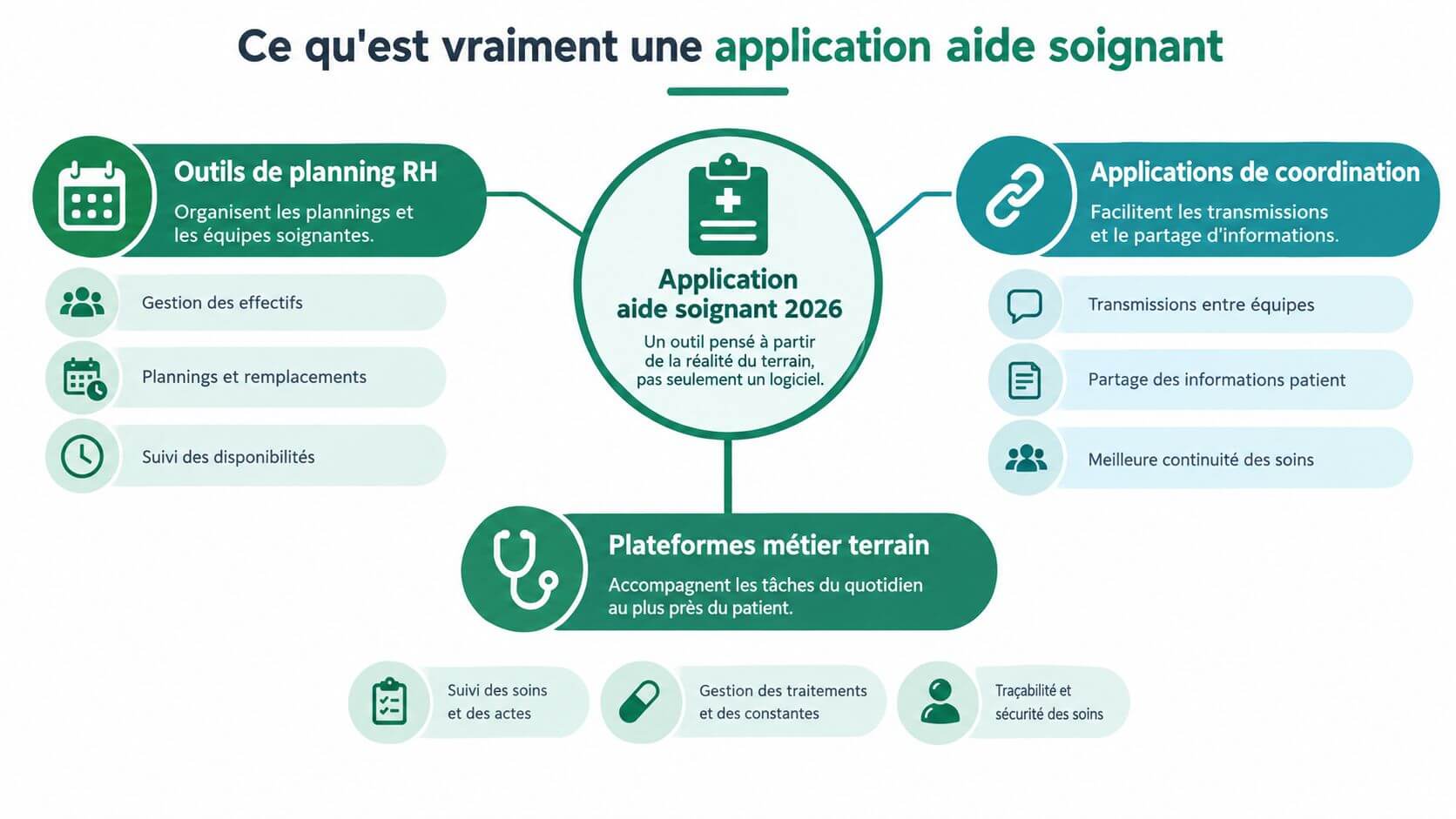
A carer application is not necessarily a carer application. In the context of home, it is rather a digital space that organizes the contribution of several actors around the same person. The caregiver finds his instructions and transmissions there, the nurse liberal the observations necessary for his coordination, and the family information adapted to his role.
Three families of tools are often confused.
- HR planning tools arrange schedules, absences, assignments and replacements. They meet the needs of the service, but do not automatically replace the transmission file at home.
- Specific mission applications facilitate liaison, search for reinforcements or access to missions. They may be useful for employment, without ensuring the continuity of observations between visits.
- Home coordination platforms structure a digital link book, a shared calendar, documents and contextualized exchanges around a loved one.
A digital extension of the link book
The history of the profession shows why traceability and collaboration occupy a central place. In France, the profession of carer was recognized in the hospital public service by the decree of the 14 April 1949, then CAFAS was created in 1956The holding of this certificate has become compulsory in order to exercise 1960, prior to the replacement by DPAS in 1996 and the recognition of the State diploma in 2005. Extra-hospital and home exercise has been authorised in 1981, depending on Institutional chronology of the evolution of the caregiving profession.
A platform consistent with this evolution must cover the actual actions and observations, without turning the caregiving aid into a prescriptive one. Timed traceability, sharing of instructions under nursing responsibility, monitoring of important events and serious management of access rights.
Recognize a coordination tool
A simple task tool usually asks you to check an action. A business platform also allows you to know why this action was planned, what instructions it was given, what has been observed and what needs to be alerted. It keeps a history that remains understandable to other professionals.
The hosting of health data, GDPR compliance, access control and the ability to work offline are not decorative options. They must be examined before deployment, as well as ergonomics. A very complete solution, but unusable between two homes, will not last for long.
Key Features to Search for in a Caregiver Application
The choice must be based on the ordinary events of the tour. A good feature is one that avoids a search, retranscription or ambiguity without adding a disproportionate burden to the visit.
The Timed Book
The care journal must provide information on the time of the visit, the identity and function of the speaker, the actions carried out and the useful observations. The aim is not to produce a long report after each visit. It is to leave a structured trace, searchable by the authorized persons.
Ask the supplier if the time is generated automatically, if the note can be changed and if the history of the changes remains visible. Also check whether a transmission can be commented on by the nurse or family without being mixed with the initial observation.
Monitoring of medicines
The application can help confirm a dose, report a forgetfulness, or make a statement visible. It does not change the scope of responsibility of the caregiver. The dose assistance must be controlled by prescribing, protocols, and nursing responsibility, especially when the medication or gesture presents a particular difficulty. good practice in helping to take medicines recall the importance of distinguishing between accompanying and administering treatment.
Ask a specific question: does the tool distinguish a confirmed catch, a refusal, an omission and an observation to be transmitted? Does it allow you to attach an alert to a validated record rather than allow everyone to interpret a reminder?
The shared calendar
A useful schedule is not only used to display the passages; it must make the medical appointments, the planned absences, the interventions of the Independent nurse and the changes in the schedule visible. Ms. Bernard's daughter can, for example, register a medical consultation. By consulting the schedule, the caregiver notes that her passage coincides with the planned departure. She exchanges with the family and adjusts the schedule, which avoids a visit during the absence of the person and preserves the accompanying time.
Ask if events are attributed to a person in charge, if reminders can be set up, and if invited professionals can only see the information relevant to their role.
Emergency form and offline mode
An emergency card must remain accessible with important contacts, known allergies, validated instructions and the information necessary for the alert. Check what remains available when the network disappears, without assuming that the entire file is necessarily searchable offline.
The offline mode must allow you to prepare useful information before the tour, to capture the observations during the visit and to check the synchronization on the return of the network. Ficile example, in a house without mobile coverage, the caretaker immediately documents his passage instead of relying on his memory at the end of the day.
Verification table
| Functionality | Field problem solved | Criteria to be checked |
|---|---|---|
| Timed notebook | Dispersed or impossible notes to attach to a passage | Author, function, time, history of changes |
| Monitoring of medicines | Forget, duplicate or lack of confirmation | Separate statuses, alerts, validated instructions |
| Shared calendar | Rendezvous and overlapping passages | Access rights, reminders, attribution of events |
| Emergency file | Search for contact or instructions in a tense situation | Out of connection availability and controlled update |
| Offline mode | Deferred seizure in white zone | Secure temporary storage and verifiable synchronization |
| HDS and GDPR | Inadequate access or insufficiently secure data processing | HDS hosting, encryption, access log, DPA |
| Shared tasks | Unmistakable responsibilities between family and professionals | Attribution, deadline, comment and documented closure |
To distinguish a real coordination from a simple list of actions, see also this resource on the shared task applications, keeping the same reflex: check the link between the task, the person accompanied and the transmission.
Route of integration of a carer on a coordination platform
The integration must be short, guided and directly linked to the first tour. A caregiver does not need a long catalogue of functions before starting. She must know who invited her, what she can consult, what she can write and how to report an unusual situation.
Five steps that correspond to the field
First step, create the professional profile. The caregiver informs his/her identity, function, sector and professional elements requested by the organization, such as his/her RPPS or ADELI ID when this setting is planned. The manager then checks that the profile corresponds well to the role he/she performs.
Second step, join the space of the nearest. In the example Tribulys, Sophie, a home carer, receives an invitation to join Mr. Martin's tribe. She creates her account, joins the shared space and discovers the members who accompany him. On another platform, access can be triggered by a code transmitted by SSIAD, the service or the family.
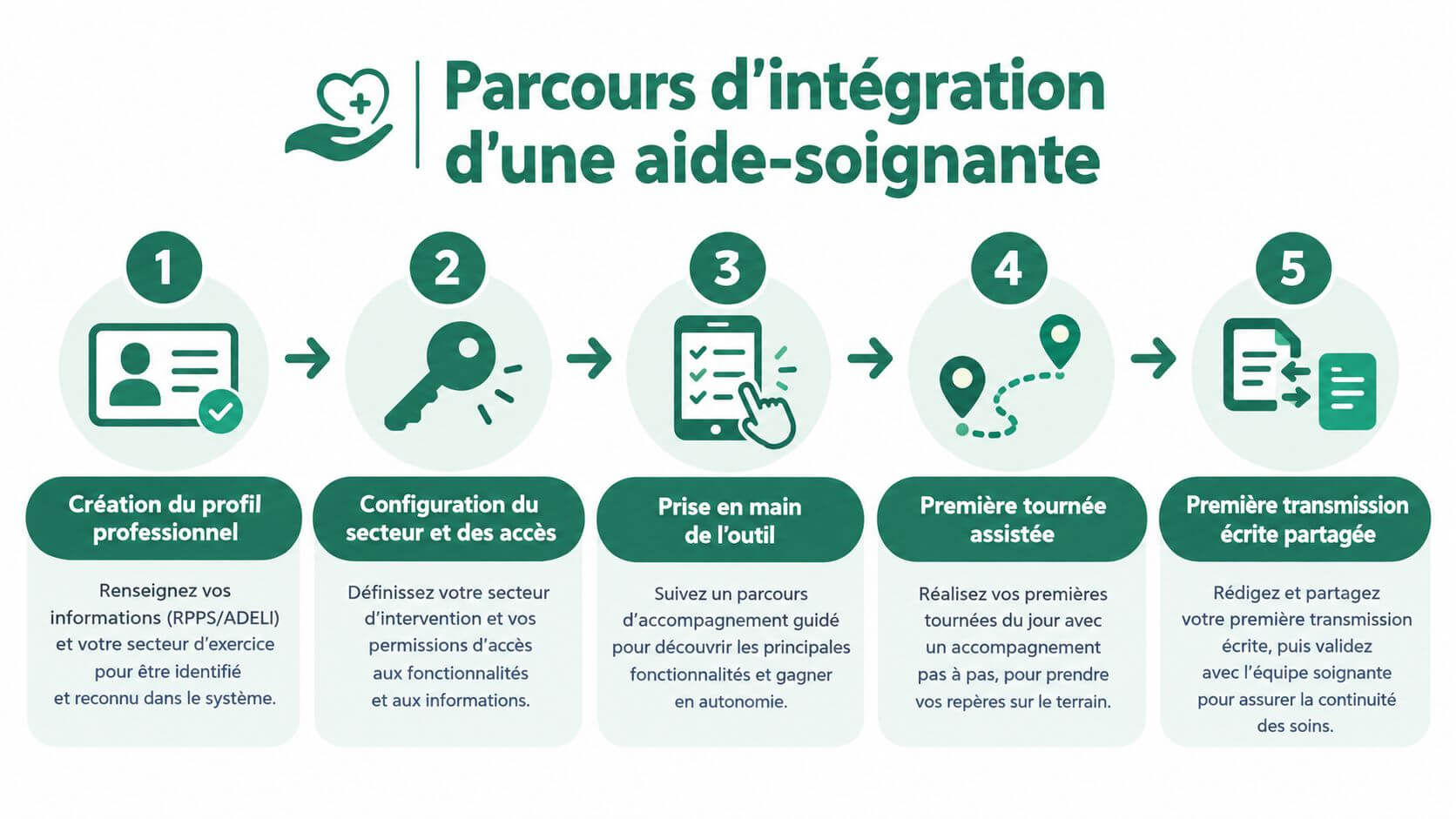
Third step, take note of the authorised information. Sophie consults the data accessible to her role, the schedule and the latest transmissions. Alerts must be adjusted with measure. A family can receive practical information, while an authorized professional has access to the elements necessary for the coordination of care.
Step four, prepare and carry out the first visit. Before arriving, Sophie checks the useful instructions. During her visit, she uses the "My Visit" function to follow the checklist, inform the care done and note a relevant observation. If the network is missing, she captures the offline data and then controls their synchronization as soon as the connection returns.
Step 5, transmit and participate in the coordination loop. After her first visit, Sophie informs the care journal. The information becomes available to authorized members, including the Independent Nurse and the Family Caregiver, according to the rights defined. The shared calendar then allows to coordinate passages and appointments.
The Court of Auditors describes the operation of home transmissions The file is consulted on arrival, then fed after intervention with the identity, function, schedules and actions performed. Digital does not change this requirement. It makes it easier to structure, provided that the organization provides the rules of use.
These steps remain transferable to other equivalent platforms, provided that access, health data, rights and hosting comply with the applicable framework, including HDS and GDPR.
Criteria of choice according to the exercise context
The same tool will not be assessed in the same way by an SSIAD, a caregiver who works alone or a family that involves several people. The right choice depends on the level of coordination required, the network available at home and the ability of each user to adopt a new ritual.
| Criterion | SSIAD / Coordinated DSS | Isolated Liberal Caregiver | Caregiver with one-time helper |
|---|---|---|---|
| HDS hosting in France | Incontourable for structured use with health data | To be checked before entering sensitive data | To explain simply to the family |
| GDPR compliance and CCA signed | Verify roles, rights and management of departures | Ask who is responsible for the treatment | Check the removal of an intervenor's access |
| Offline operation | Test rural areas and poorly covered homes | Priority if the tour crosses white areas | Useful for one-off visits and travel |
| Multi-user access | Necessary for team, IDE and coordinators | Indispensable as soon as another professional intervenes | Must remain simple to invite a loved one |
| Free for guest carers | Facilitates family attachment without creating barriers | Avoid raising the cost to each stakeholder | Central criterion for family use |
| Timed trackability | Linked to internal procedures and transmissions | Useful to prove the content of the passage | Allows you to distinguish between observation and comment |
| PDF export of the notebook | Practical for the file or a structured synthesis | Useful in case of organizational change | Facilitates sharing with an authorized professional |
| Multi-establishment mode | To be provided if the service follows several structures | Less priority, except distributed activities | Rarely necessary for a single tribe |
| Simplicity of invitation | To be standardised in the reception route | Must allow to quickly add an interlocutor | Must operate without long technical training |
Arbitration between perimeter and simplicity
A tool limited to a checklist will be quickly taken in hand, but it will not be enough if the Independent nurse has to find an observation, if the family has to understand a change of appointment or if the service has to check the continuity of the transmissions. Conversely, a very rich solution can fail if the caregiver has to navigate through several screens to close a visit.
The presentation of home maintenance software can serve as a starting point for reviewing expected functions. The essential thing remains to test a complete scenario, from invitation to transmission, with a professional, a close friend and a person in charge of coordination.
A successful demonstration is not the one where the supplier shows the most menus. It is the one where the team reproduces a real visit, with a set-up, an unexpected and a final transmission.
Implementation Steps and Operational Checklist
The deployment must start with the existing flows, not with the chosen application. For a few days, the service manager or the contact helper observes where the information flows: paper notebook, SMS, calls, internal messaging, documents kept at home. This mapping reveals duplicates, areas without responsibility and information that are never traced.
A seven-step deployment
1. Mapping flows. Note who receives the information, who reformulates it and who needs to act. A statement given on the phone does not have the same operational value as a dated observation in the shared folder.
2. Define priority uses. Start with treatment transmissions, appointments, alerts and treatment monitoring. Do not try to digitize each exchange from the first day.
3. Choose a small pilot group. Select a few voluntary situations, with different profiles: home well covered, unstable network area, family available or remote helper. The pilot must test the reality of the tours, not just the registration.
4. Set profiles and rights. Give professionals the rights necessary for their job. The family may have access to consultation or comment, while the writing of certain instructions remains reserved for authorized persons.
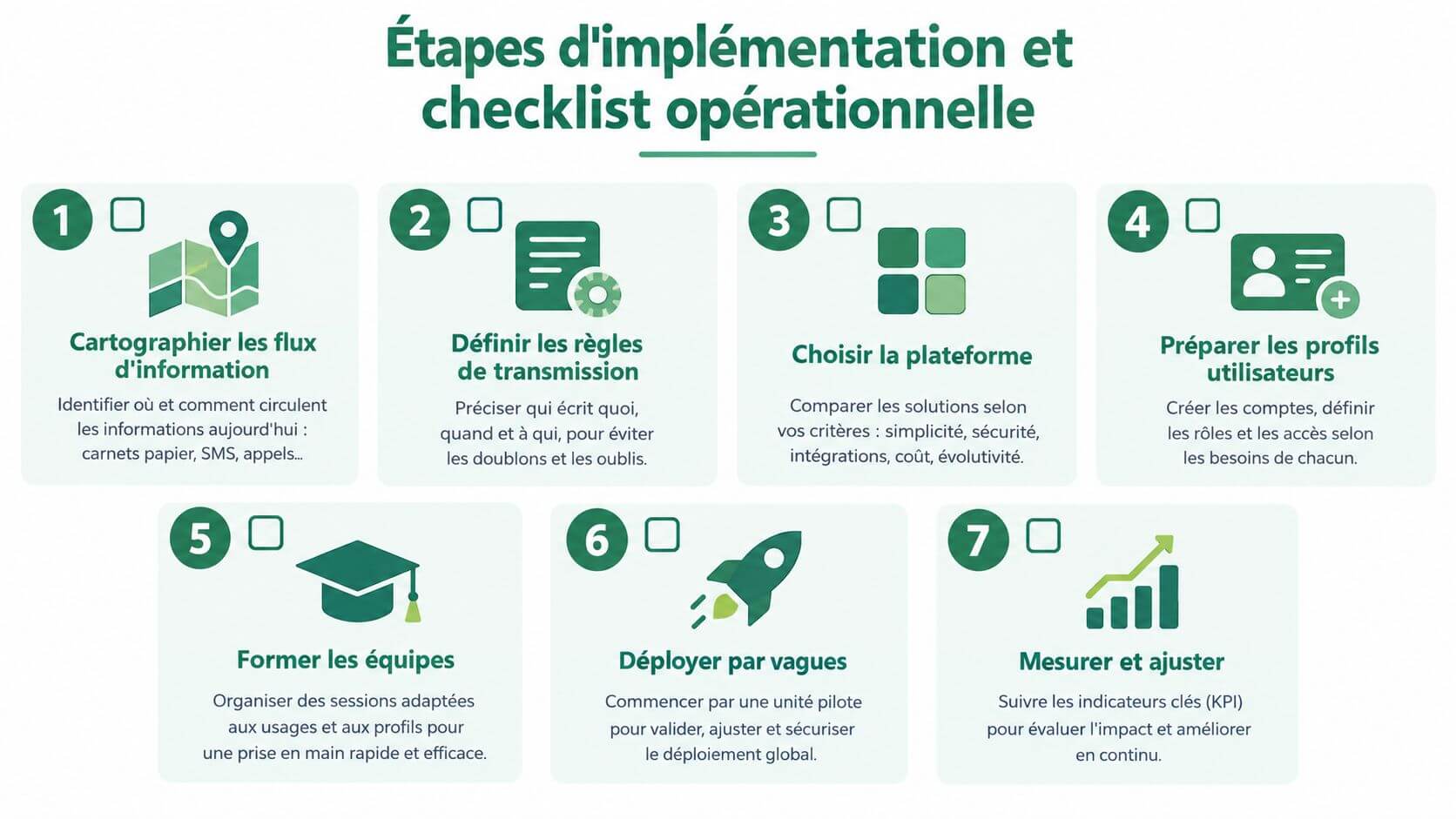
5. Train on the smartphone used on tour. A short demonstration, performed on the real medium, is better than a general presentation. Have a visit opened, an observation entered, the management of an alert and off-line synchronization.
6. Install a closing ritual. At the end of the visit, the intervenor checks the essential fields, distinguishes an observed fact from a request and ensures that the alert is addressed to the right interlocutor. This ritual must remain compatible with the actual charge of the tour.
7. Measure and adjust. After the pilot period, compare the share of written and oral transmissions, clarification calls, synchronization difficulties and unused access. These indicators are used to correct the rules, not to sanction professionals.
The checklist to keep in hand
- verified HDS hosting, with the exact scope of the service included.
- DPA signed and responsibilities identified.
- Off-connection mode tested on a home actually concerned.
- Invitations to caregivers free of charge, if this model corresponds to the organization.
- PDF export enabled, with a readability check.
- Planned departure procedure, in particular in the event of a change in the intervenor or of the exit of the device.
- Charter of use co-signed with the liberal professionals and relatives concerned.
The Home Services Digital Framework recommends a single, digitized link tool to allow stakeholders to record their comments and provide instructions. accompanying guide to the digital component of the reform of home-based services It also recalls that digital technology can improve real-time monitoring and secure data, but requires an adaptation of work organisation.
Benefits, limitations and conditions of success
The first expected benefit is the continuity of information. A signed and dated note allows us to understand what has been done at home, without depending on a memory or a transcript. It can also facilitate the analysis of an event, provided that it remains factual and respects access rights.
Centralization reduces interrupted calls and searches in several conversations. It can also make the treatment circuit more visible, without replacing prescription, protocol or clinical judgment. An application must never cause a caregiver to interpret a situation that is the responsibility of the nurse or physician alone.
What Can Fail
The digital divide remains real. An elderly person may not use the tool, a relative may not be available and a professional may encounter difficulties with the smartphone or connection. The device must therefore provide for an accompaniment solution and emergency rules, without recreating several competing systems.
The disconnection can be partial. It is necessary to know exactly what data is stored temporarily, how they are protected and how synchronization is confirmed. Finally, no application replaces observation in bed of the patient, direct communication in case of emergency or climbing to the right professional.
For teams who also reflect on the rational use of artificial intelligence in the preparation of medical information, the examples of medical prompts IA can feed a reflection on limits, confidentiality and human validation. These tools should not be used to produce an automatic clinical decision based on home data.
Success is based on a clearly designated reference, field-specific training, regular rereading of transmissions and HDS verification prior to deployment. To proceed with a simple method, remember three verbs: centralize information, draw each useful passage, alert the right person at the right time.
Tribulys offers a shared space to centralize the care journal, calendar, useful information and transmissions between family caregivers and professionals working at home. Tribulys and test whether its operation corresponds to your tours, your coordination rules and the level of access you want to give each player.
Put this organisation into practice with Tribulys
Keep your care journal, shared calendar, tasks, medication tracking and emergency information together. Start for free and invite the relatives and professionals involved in your loved one’s care.