
You might be managing a parent at home with three SMS threads, two missed calls, a paper notebook on the kitchen table, and, somewhere, a physiotherapy appointment that might clash with the visit of the home help. In this kind of coordination, the real problem is not to "find a calendar"; it's to find a free professional shared calendar that remains readable, avoids duplicates, and does not let everyone see everyone. For a family, an IDEL, a physiotherapist, or a SAAD, the right tool must mainly provide reminders, clean sharing, clear access rights, and if possible, simple integrations with already established habits.
In France, the free option remains a major entry point for small structures and groups looking to reduce coordination costs without losing real-time synchronization, as recent guides on shared calendars and free options like Google Calendar, Outlook, or alternatives like Joynit (shared calendar and free tools) recall. But free does not mean suitable for the field. To coordinate a patient at home between family, IDEL, physiotherapist, home help, and general practitioner, it’s essential to sort quickly without being distracted by overly general or rigid tools.
Table of Contents
- 1. Tribulys
- 2. Google Calendar
- 3. Microsoft Outlook.com Calendar
- 4. Zoho Calendar
- 5. Teamup Calendar
- 6. Framagenda
- 7. Nextcloud Calendar
- 8. TimeTree
- 9. Calendar.online
- 10. Infomaniak Calendar
- Comparison: 10 free professional shared calendars
- Which free professional shared calendar to choose based on your usage
1. Tribulys
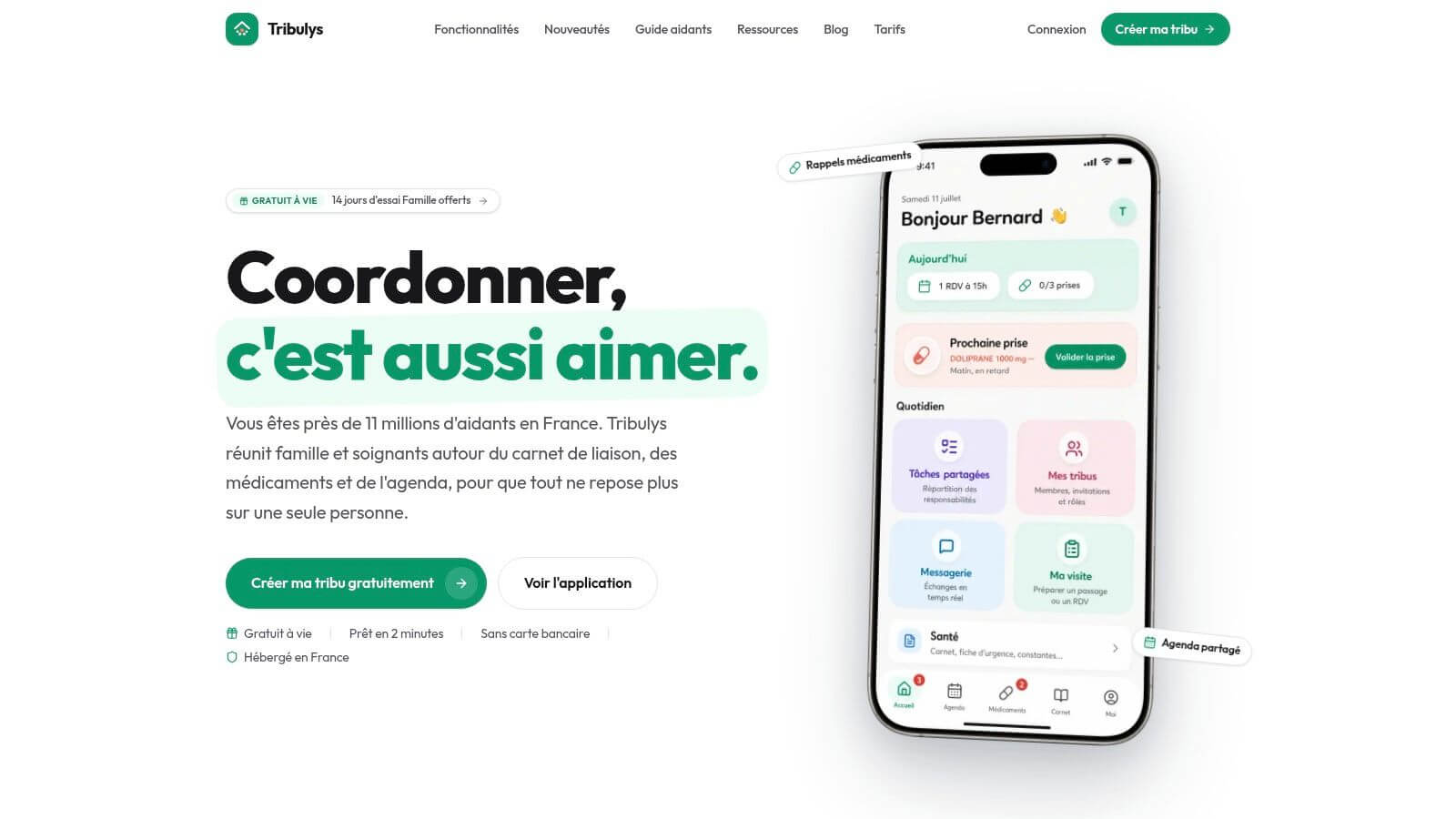
Tribulys tackles the real issue, daily coordination around a loved one maintained at home. The tool is not limited to a calendar; it includes a dated and signed care journal, medication tracking, assignable tasks, private messaging, and an emergency protocol. The logic is clear, designed for families and caregivers who do not have time to piece information together manually.
The strong point is the centralization. When an IDEL notes a visit, a home help adds an observation, or a loved one confirms a medication intake, everyone relies on the same foundation, with real-time synchronization. In practice, this cuts short verification calls, the "I thought it was you" moments, and the forgetfulness arising from scattered exchanges.
Why Tribulys clearly favors home care
The platform targets the field, not office organization. The tribe can be created in 2 minutes without a credit card, the Essential plan is free for life for up to 5 members, and the Family subscription at €5.99/month adds unlimited members, My offline visit, weekly summary, and PDF export. The data is hosted in France/EU, and compliance with GDPR clearly reinforces its appeal for sensitive data.
Practical Rule. If you are coordinating a patient at home, do not choose a calendar that only “creates an event.” Choose a tool that also allows for transmission, confirmation, and historical tracking.
The real advantage of Tribulys is the clarity of roles. Segmented access by individual invitation prevents exposing all content to everyone, which is crucial when family members, independent professionals, and remote caregivers do not have the same information needs. To frame the choice of tool based on coordination constraints, our guide on the 4 criteria for choosing the right tool for coordinating care provides a useful reference (coordinating care). To further enhance home organization, the dedicated guide to home care planning aligns well with the tool, with very practical usage logic (organizing a home care plan).
Clear Verdict. If your primary need is to coordinate a loved one at home without multiplying WhatsApp groups, Tribulys is the most coherent choice. The free version is enough to start a real tribe, and the Family version becomes relevant as coordination expands.
2. Google Calendar
Google Calendar remains the simplest reflex for many teams, and this is no coincidence. Its strength lies in the very low adoption friction, as many interlocutors already have a Google account or know how to use it without learning.
The sharing is clean and flexible. Google Workspace documents that a group calendar can be shared with specific individuals or an entire organization, with adjustable access rights, making it a very clear technical standard in the Francophone landscape (Google Workspace group calendar management).
When Google Calendar suffices, and when it gets in the way
For light coordination between family, physiotherapist, and attending physician, it does the job. We create a calendar for each person or each type of appointment, we color-code events, we invite the right contacts, and everyone sees availability without getting lost in a cumbersome tool. The integration with Gmail and Google Meet is also convenient for those already working in this environment (Google Calendar).
But the crux of the problem is not there. In a caregiving context, the granularity of control remains technical, not thought out for home roles. If you need to separate information between family, home nurses (IDEL), and assistants without exposing everything, Google Calendar remains useful, but it wasn't designed primarily for clinical or para-clinical coordination.
Google Calendar is a good basic planning foundation. It becomes less convincing as soon as it needs to manage fine access, transmissions, and a more structured confidentiality.
Its true value lies in interoperability. For a small structure, it integrates easily into existing habits, and that's often what makes the difference when you want to move quickly. If you're looking for a free, simple tool that's already familiar, it's a solid choice, but it's not the most specialized for a multi-intervenant home.
3. Microsoft Outlook.com Calendar
Outlook.com Calendar plays the same basic role as Google Calendar, with a clear preference for teams already embedded in the Microsoft ecosystem. If relatives or caregivers are already using Outlook daily, the tool reduces the learning curve.
Sharing is done by invitation between Microsoft accounts, but also via HTML links and ICS feeds for viewing or subscription in other applications. This logic works well for structures that want to publish a schedule or embed it in multiple environments without redoing the work manually (Outlook Calendar).
The strong point is the recipients' subscriptions
ICS feeds are interesting because they allow subscribers to follow a calendar without re-entering events. For simple uses, it's exactly the type of mechanism that prevents information loss between multiple calendars.
The downside is known. The published HTML and ICS links remain read-only for recipients, so it's more about broadcasting than co-construction. For a family that needs to collectively modify segments or correct schedules on the fly, it can become too rigid.
The tool remains relevant if your organization is already embedded in Microsoft. It connects well with classic office usages, but it does not provide, on its own, the business layer that a coordinated home often requires. For free usage, it's a serious base, not a patient coordination hub.
4. Zoho Calendar
Zoho Calendar deserves attention because it offers a true free team calendar in a more collaborative framework than purely personal solutions. The free offer of Zoho Mail can accommodate up to 5 users, which is sufficient for small teams or a limited coordination cell (Zoho Calendar).
The logic is clear: group calendar, private or public sharing, free/busy display, and CalDAV synchronization for external clients. For a collective that wants to maintain a clean structure without upfront payment for a complete suite, it's a credible alternative.
Who Zoho is really useful for
Zoho is mainly suitable for small teams looking for group organization, not an ultra-simple interface. The Zoho Workplace ecosystem can become interesting if you want to connect calendars and other collaborative tools, but you need to accept a wider interface and platform logic than the simple calendar.
The weak point becomes apparent quickly. Some advanced integrations and administrative functions require paid options, and the free plan remains limited in size. For an office or home coordination with many distinct roles, it can last a while, but it does not replace a tool designed for care.
Zoho is, therefore, a good compromise for a small structured organization, less so for a care tribe where information needs to circulate quickly among various profiles. If your main need is a group calendar with CalDAV/ICS interoperability, it does the job. If you want field transmissions and a true segmentation of access, you need something more specialized.
5. Teamup Calendar
Teamup gets straight to the point. The tool is designed to easily share a schedule via links, without requiring all participants to create accounts. For relatives, volunteers, or occasional caregivers, this simplicity changes everything (Teamup Calendar).
The model using sub-calendars is very clear. You can separate resources, people, or projects, which helps to avoid chaos when multiple actors contribute to the same space. The free plan allows up to 8 sub-calendars and up to 50 configurable sharing links, with multiple views and a mobile app.
The right choice for mixed teams without heaviness
Teamup works well when you want to move quickly and not manage authentication for everyone. It's valuable for a home where some caregivers rarely visit, or for a family that wants to provide access to a schedule without deploying an entire account system.
The downside is simple: the free version remains limited with the freshness of certain data and on more advanced functions. It is not the richest tool if you're looking for complex roles or a very professional environment, but it's formidable for operational clarity.
If you need a readable shared schedule ready in a few clicks, Teamup is one of the fastest to set up. If you need transmissions and patient tracking, it becomes too light.
In practice, I recommend it for mixed teams, not for true care management. It's a good free professional shared calendar, but not a complete home coordination tool.
6. Framagenda
Framagenda ticks an essential box for certain structures, the data sovereignty. The service offered by Framasoft is based on Nextcloud, with a logic of sharing calendars, contacts, and tasks designed for Francophone and community use (Framagenda).
The sharing between Framagenda accounts, email invitations with ICS attachments, and CalDAV compatibility make it a serious option for organizations that want to maintain control over their data. For associations, collectives, or teams that place a true emphasis on GDPR and hosting in France/EU, the argument is strong.
Its true value lies in governance
Framagenda is not there to seduce with marketing hype. It mainly reassures with its philosophy, associative roots, and compatibility with third-party clients. For teams sensitive to data localization, this is a decisive point.
The limit makes sense. An association does not play the role of a hyperscaler, so one must accept different resources and quotas, and an ecosystem less massive than Google or Microsoft. You gain in coherence but lose in commercial power and ease of deployment on a large scale.
For a small health structure or a collective of caregivers who wish to remain sober, Framagenda is a good choice. For very dynamic coordination, with a lot of back-and-forth and mobile usage, it requires more discipline. It's a trustworthy tool, not a gimmick.
7. Nextcloud Calendar
Nextcloud Calendar is aimed at those who want to fully control their environment. It's the natural choice if you want to self-host or use a managed provider, while maintaining a fine logic of sharing, federation, and integration with the rest of the Nextcloud ecosystem (Nextcloud).
The tool offers sharing between users, public WebCal links, CalDAV support, and features for booking and proposing time slots. For a structure that wants to go beyond a simple calendar, it's a very solid foundation.
The tool is strong, but it requires technical responsibility
Nextcloud is not a choice for immediate comfort. It requires technical administration or a managed host, which means some maintenance, supervision, and method. In return, the control stays with you.
The real advantage, for the health or para-health sector, is control. You decide where the data is, how it flows, and how it integrates with Files, Talk, or other collaborative work tools. This is exactly what we seek when confidentiality is paramount.
For a structure that already has a bit of digital maturity, Nextcloud is one of the best free foundations. For a family that just wants to coordinate visits tomorrow morning, it is too heavy-handed.
It is therefore not the best choice for a quick start, but it becomes very relevant once you want a more sovereign and scalable architecture. It must be treated as a project, not as a simple click-tool.
8. TimeTree
TimeTree is designed for groups that want a simple, visual, and quickly manageable collaborative calendar. The app is available on mobile and the web, with comments around events, albums, and notes by calendar (TimeTree).
The interesting point for light coordination is the ability to group several members into one calendar. In a home context, this can be sufficient to coordinate a small family, a pair of caregivers, or a very small team of providers.
When TimeTree works well
TimeTree is useful if you want a quick reading of events and a short discussion around an appointment. For a simple operational plan, the onboarding is immediate, and that matters a lot when users are not tech-savvy.
The problem is the absence of real professional depth. Advanced role tools, enterprise security, or deep integration features lag behind more structured suites. For home use, it can quickly become too light if you need to track treatments, handover notes, or intervention priorities.
TimeTree is good for coordinating. It is less good for securing a care pathway.
If you are just looking for a readable shared calendar, it may suffice. If you want to avoid forgetting medications and scattered information, you will need to upgrade. For this specific need, the link to the guide application to not forget your medications is more relevant than multiplying manual reminders (medication tracking and reminders).
9. Calendar.online
Calendar.online focuses on absolute simplicity, sharing via URL, and no account access. It is the option to remember if you want to publish a planning view quickly or give temporary access to people who should not create an account (Calendar.online).
The free Basic plan allows you to get to the essentials, with an iOS app and basic functions. For a public or semi-public display, it's practical, especially when the goal is just to make a schedule viewable without friction.
The right tool for ultra-simple dissemination
The big advantage is the absence of barriers to entry. A colleague, client, or caregiver can access the planning via a URL, without logging in or remembering a password. For a lightweight intranet or a public page, it’s exactly what is needed.
The boundary is equally clear. The free functions remain basic, with a limited number of access points and options. As soon as it is necessary to manage multiple roles, multiple levels of confidentiality, or frequent changes by several people, the tool shows its limitations.
Calendar.online is useful when quick sharing is required. It does not replace true home coordination. For a family that just wants to display slots, yes. For a care pathway, no.
10. Infomaniak Calendar
Infomaniak Calendar is an interesting alternative for those seeking a privacy-first approach with a Swiss infrastructure. The free offer of email and cloud allows access to the calendar, with CalDAV synchronization, public sharing via ICS URL and internal sharing with multiple permission levels (Free Infomaniak Cloud).
For a TPE, an association, or a small collective wishing to present a sovereign image and host away from large American ecosystems, this argument is significant. Integration with kMail, kDrive, and kMeet also helps maintain a cohesive environment.
A clean option for cautious structures
Infomaniak is appealing because it combines a managed approach with real attention to confidentiality. For a structure looking to avoid overly exposed solutions, it is a reassuring option.
The trade-off is lower external adoption. Many contacts are familiar with Google or Microsoft, but fewer know Infomaniak, which may slightly prolong user onboarding. Some advanced functions are still evolving, so one must accept a somewhat less standardized framework than the market giants.
For a structure prioritizing confidentiality and simplicity of hosting, the tool is credible. To coordinate a household with very varied stakeholders, it mainly functions as a calendar, not as a business hub. It thus occupies a space between traditional office tools and the need for sovereignty.
Comparative, 10 free shared professional calendars
| Solution | Key features | UX Quality (★) | Proposal & price (💰) | Target audience (👥) | Distinct advantage (✨) |
|---|---|---|---|---|---|
| 🏆 Tribulys | Timestamped signed journal, medication tracking, agenda, My visit, tasks, emergency form, messaging | ★★★★★ | 💰 Essential 0€/month (≤5), Family 5.99€/month, 14-day trial | 👥 Families, IDEL, physiotherapists, aides, doctors | ✨ Hosting FR/EU, GDPR, real-time sync, offline (Family) |
| Google Calendar | Sharing/permissions, invitations, Gmail/Meet integration, ICS | ★★★ | 💰 Free (Google account) | 👥 General public, professionals using Google | ✨ Strong Google integration, massive adoption |
| Microsoft Outlook.com Calendar | Microsoft sharing, ICS/publication feed, Outlook integration | ★★★ | 💰 Free (Microsoft account); 365 for professional functions | 👥 Microsoft users / businesses | ✨ ICS interoperability, familiar in business |
| Zoho Calendar | Team calendars, private/public sharing, CalDAV | ★★★ | 💰 Free (up to 5 users with Zoho Mail); paid options | 👥 SMEs, Zoho teams | ✨ Team calendar integrated into Zoho Workplace |
| Teamup Calendar | Link sharing, sub-calendars, multiple views, mobile | ★★★ | 💰 Free plan (limited); higher tiers | 👥 Mixed teams, associations, shared resources | ✨ No accounts needed for guests |
| Framagenda (Nextcloud) | Sharing between Framagenda, CalDAV, ICS invitations | ★★★★ | 💰 Free (associative) | 👥 Associations, users concerned with GDPR | ✨ Associative hosting FR, data sovereignty |
| Nextcloud Calendar | Sharing/federation, booking, CalDAV, Nextcloud integration | ★★★★ | 💰 Free software; self-hosting costs | 👥 Organizations wishing to self-host | ✨ Total data control and extensibility |
| TimeTree | Shared agendas, comments, import of external calendars | ★★★ | 💰 Free / premium for advanced functions | 👥 Families, small groups, simple teams | ✨ Simple interface + collaborative notes |
| Calendar.online | URL sharing without account, integrable public view | ★★★ | 💰 Basic free (limited), paid options | 👥 Teams displaying public schedules without accounts | ✨ Ultra-simple sharing via public link |
| Infomaniak Calendar | CalDAV, sharing with permissions, kSuite integration | ★★★★ | 💰 Free with Mail/Cloud account; paid pro offers | 👥 TPE/associations seeking confidentiality | ✨ Hosting in Switzerland, privacy-first |
Which free professional shared calendar to choose based on your usage
For family caregivers and home caregivers, I decisively choose, Tribulys takes the lead. It is the only one in this selection that aligns shared agenda, handover notes, medication tracking, tasks, and confidentiality in a truly home-friendly logic. When it is necessary to coordinate family, IDEL, physiotherapist, home aids, and the attending physician, a simple calendar is not enough.
For classic office uses, Google Calendar and Outlook.com Calendar remain the simplest choices. Google wins if your surroundings already live in Gmail and Google Meet, Outlook wins if the Microsoft environment is already set up. Their strength is rapid adoption, not job specialization.
For small teams wanting a free group calendar without unnecessary sophistication, Zoho Calendar, Teamup, and TimeTree are the best compromises. Zoho is suitable for a small structured collective, Teamup for very flexible link sharing, TimeTree for light groups that just want to collaborate neatly.
For data sovereignty, I put Framagenda, Nextcloud Calendar, and Infomaniak Calendar at the top of the list. Framagenda reassures with its associative foundation, Nextcloud provides total control if you accept technical administration, and Infomaniak offers a simpler managed option with a privacy-first positioning. If your absolute priority is GDPR, hosting and control, that's where to look.
Calendar.online plays a different role. It serves when you need to share quickly, without an account, without onboarding, without debate. It’s a good dissemination tool, not a complex coordination tool.
Before choosing, keep this simple grid in mind. Check the privacy and GDPR, the number of members, the presence or absence of offline capabilities, CalDAV/ICS integrations, and above all the ability to manage patient-related reminders. If the tool doesn’t allow for separating access, avoiding duplicates, and maintaining an exploitable record, it’s not suited for home use.
To switch seamlessly, do it in five steps. Create a single reference schedule, import only the useful appointments, clearly name the roles, test each profile's access, and then set a short weekly update ritual. If you want a truly useful free professional shared calendar in daily life, choose a tool that reduces calls, secures information, and saves time from day one.
If you are coordinating a loved one at home, Tribulys provides you with a shared calendar, medication tracking, and handover notes in one space, without forcing you to stack tools. It's the most direct solution for sharing information between family caregivers and healthcare providers without wasting time. Discover Tribulys and see if your coordination can finally become simple.
Put this organisation into practice with Tribulys
Keep your care journal, shared calendar, tasks, medication tracking and emergency information together. Start for free and invite the relatives and professionals involved in your loved one’s care.